Life Sign
A Daily Check-In for Families Who Live Apart
Summary
Life Sign is an app for Android and iPhone for people who live alone or far away from their family. If something happens to someone who lives alone, it can take a long time before anyone notices. Texting every day just to say you are okay helps, but it is easy to forget and gets tiring after a while. Life Sign sends that message for them.
The message comes from something that is already part of their day, such as turning off the morning alarm. When the person turns the alarm off, the people they chose get a message on WhatsApp or another messenger saying they are up. If the alarm is not turned off, those people are told that the check-in was missed, so they know it is time to call.
Tracking apps like Life360 and emergency buttons like Life Alert put the person being watched at the centre, which feels like surveillance or like being treated as fragile. In Life Sign, the person sending the message decides which moment sends it, to whom, on which days and with what text, and nothing is sent that they did not set up.
Overview
- Lets the family of someone who lives alone know that the person is okay, without a daily text.
- Sends that message by itself, from a moment that is already part of the person's day, such as turning off the morning alarm.
- Tells the family when that moment does not come, so they know it is time to call.
- Leaves the person sending in charge of what is sent, to whom, and when, instead of having them watched.
- Shows two connected people whether the other's phone was used today, never where they are.
- Works on Android and iPhone and sends through WhatsApp or another messenger.
Role
- Product Designer and Systems Designer
- Product concept
- Research into tracking apps and emergency alert services
- Rules for when a message goes out and when a check-in counts as missed
- Interaction design for the five moments and for seeing whether the other person was active
- Interface design and design system in Figma
- Mobile app development
- Server and message delivery
- Deployment and operation
00. Table of Contents
Living alone, and the daily message to say you are okay.
02. How It Differs from Tracking AppsWho decides what gets sent.
03. The Morning AlarmTurning off the alarm sends the message.
04. When the Alarm Is MissedThe message that tells the family to call.
A reminder, a place, an unused phone, and a low battery.
06. Seeing Whether the Other Is ActiveA rough state, never a location.
07. Design SystemOne Figma file behind all 33 screens.
08. How a Message Gets DeliveredFrom the phone to the family, once.
01. Why It Exists
More and more people live alone or far away from the people who care about them.
Many of them send a message every day to say they are okay, and after some weeks that message becomes one more thing to remember. Life Sign sends it for them, from small things they already do every day, such as turning off the morning alarm or arriving home.
02. How It Differs from Tracking Apps
In Life Sign, the family sees only the messages the person chose to send.
In Life Sign, the person chooses which moments send a message, who receives it, on which days, and with what words.
Who decidesThe service and the family
What the family seesAn alert when the button is pressed
When something is sentOnly when something has already gone wrong
Who decidesThe family group
What the family seesWhere the person is
When something is sentAll the time
Who decidesThe person sending
What the family seesOnly the messages the person set up
When something is sentAt moments from the person’s own day, such as turning off the alarm or arriving home
To start, they pick one of five ready setups, such as Solo Living Adult, which is a morning alarm and an evening check-in with an alert after 18 hours without activity, and change what they want from there.
03. The Morning Alarm
Turning off the morning alarm sends the family a message.
The person sets their alarm in Life Sign instead of the phone’s clock app, and when they turn it off in the morning, the people they chose get a message such as “Good morning!”. Nothing new has to be remembered, because turning off the alarm is something they do every morning anyway.
04. When the Alarm Is Missed
When the alarm is not turned off within 30 minutes, the family gets a message that the check-in was missed.
Snoozing does not count as being up. The missed message also says when the phone was last used, for example at 23:14 the night before, so the family knows it is time to call.
05. Other Moments That Send a Message
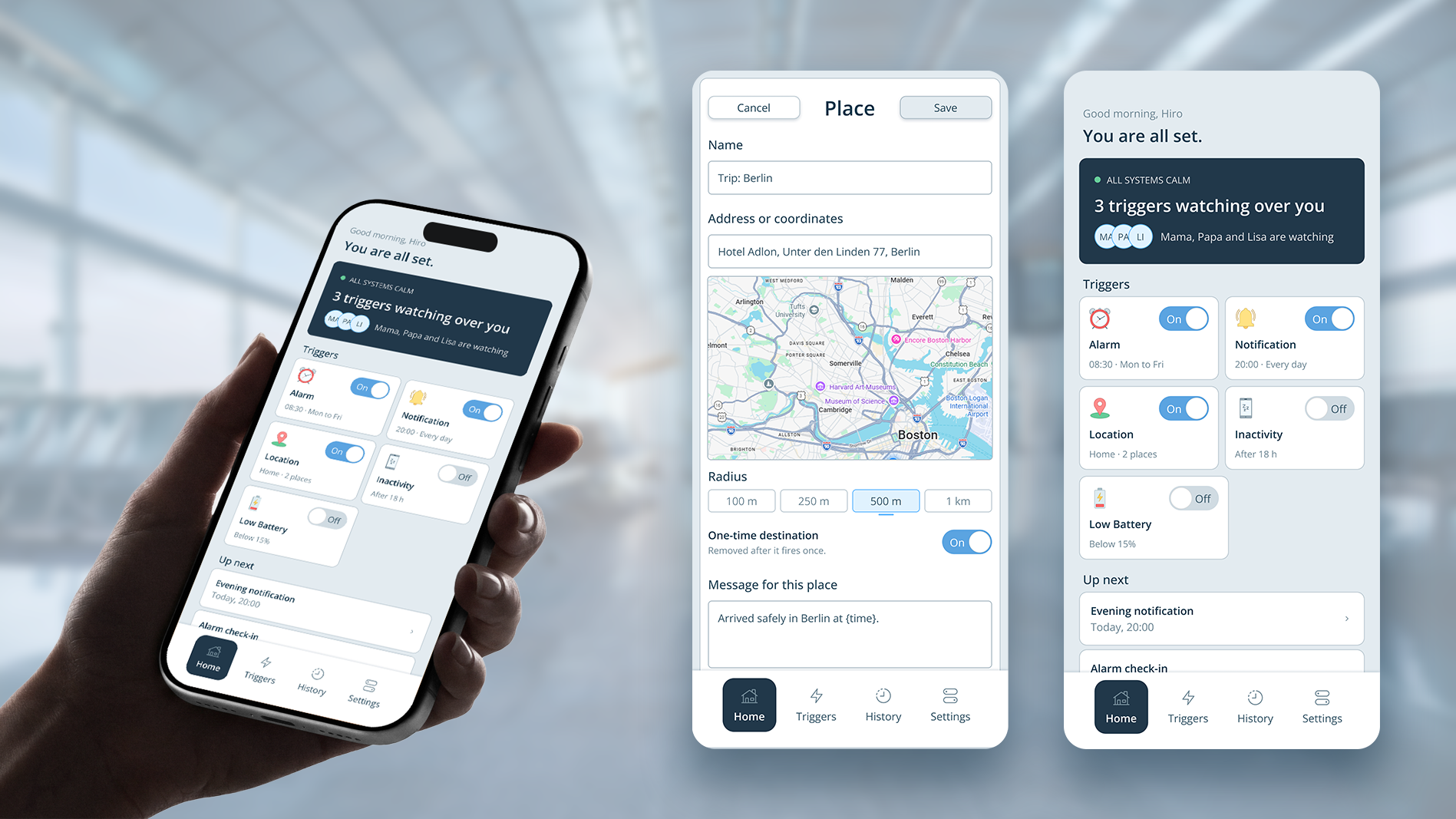
Besides the alarm, four other moments in the day can send a message, and each one has its own people, days, and words.
Notification
The first is a daily check-in at a time the person picks, for example 20:00 every evening. At that time the phone shows a reminder that says “Evening check-in. Tap to tell everyone you are fine.” When the person taps the reminder, the family gets the message. When the reminder is still untouched an hour later, the family gets the missed message instead, the same way as with the alarm.
Location
The second is arriving at a saved place, such as home, work, or the hotel for a trip to Berlin, each with a radius between 100 metres and 1 kilometre. When the phone comes inside that radius, the family gets a message such as “Arrived safely in Berlin.” A place for a trip can be set to one time only, so it disappears after the first arrival.
Inactivity
The third is a phone that nobody has used for a long time, for example 18 hours on weekdays and 24 hours on weekends. Picking up the phone, turning on the screen, and walking or driving all count as use, and the night hours from 23:00 to 07:00 do not count at all. Fifteen minutes before the family is told, the phone asks the person first, so a phone that was only left on the charger does not worry anyone.
Low Battery
The fourth is a low battery. When the battery drops to the level the person picked, for example 15 percent, the family gets “My phone is at 15% and may switch off.” The message goes out once per charge and only while the battery is dropping, so plugging the phone in at exactly 15 percent sends nothing. When the phone goes quiet after that, the family already knows why.
06. Seeing Whether the Other Is Active
Two people who both use Life Sign can see whether the other’s phone has been used recently.
One person sends an invite code, and once the other accepts, each sees the other as active today, active within the last hour, or not active for 4 hours or more. The Presence screen never shows a location or a time of day, and both people see the same, so neither one is the one being watched.
07. Design System
The app's code is checked against the design system.
The screens were designed in Figma, and the Design Engine turned them into one library. It gives AI practical design knowledge and enforces a product's design system when AI creates or changes an interface. The states of every component come from it, and the app's code was built to match the screens.
08. How a Message Gets Delivered
Turning off the alarm is recorded on the phone first and then passed to the Life Sign server.
The phone gives each event its own number and keeps it until it has a connection, so nothing is lost when the phone is offline. The server keeps the times, decides when a check-in counts as missed, and sends the messages, as a Life Sign notification to people who have the app and through WhatsApp or another messenger to everyone else. When the phone sends the same event twice after a restart, the server recognizes the number and applies the event once, so nobody gets the same message twice.
- 01The phoneThe alarm is turned off, and the phone saves the event with its own number.
- 02The serverIt keeps the times and decides when a check-in counts as missed.
- 03The deliveryThe Life Sign app for people who have it, WhatsApp or another messenger for everyone else.
- 04The familyThe message arrives once, even when the phone sent the event twice.