When Is It
Okay to Step
Outside the
Design System?
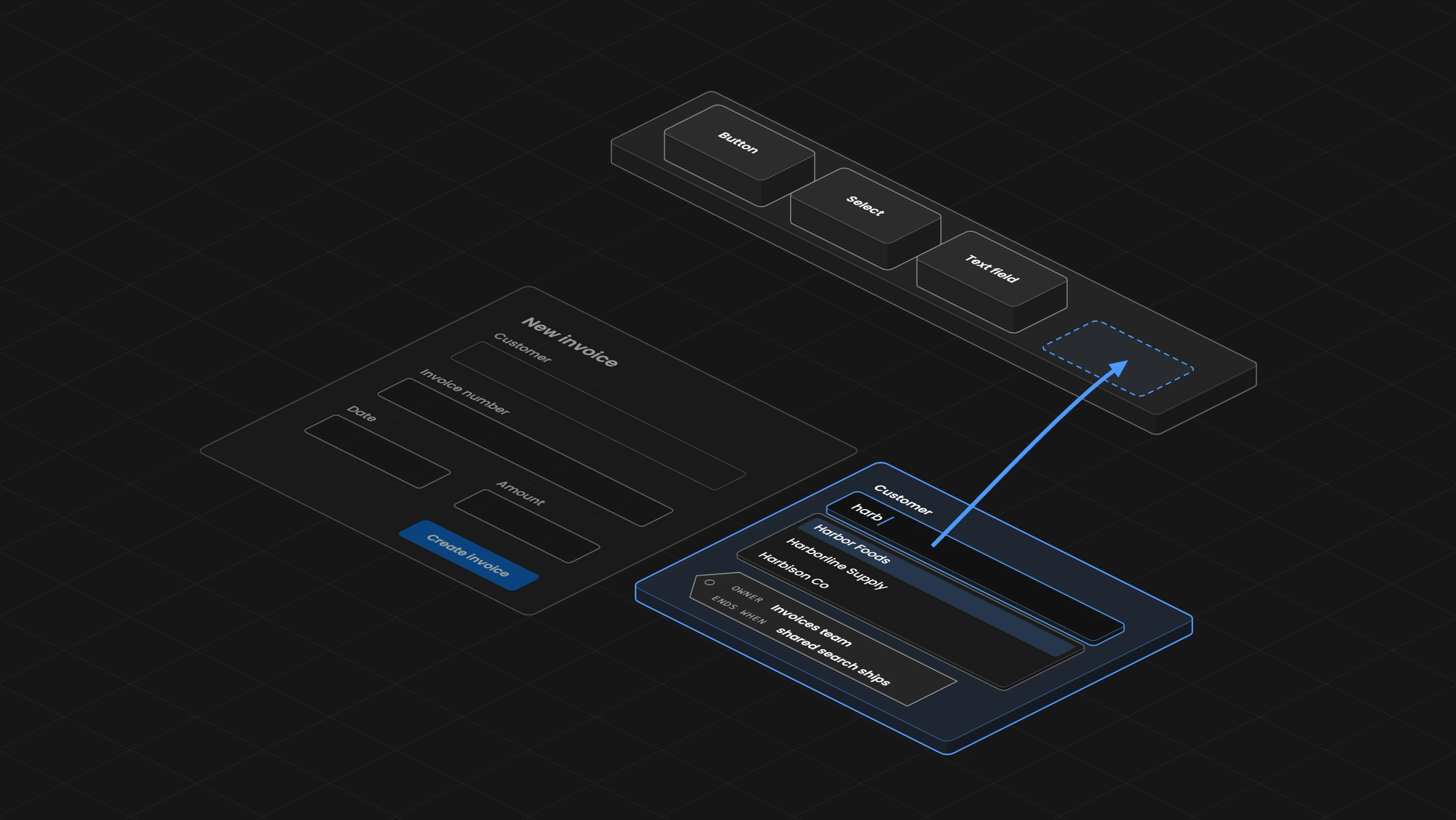
A need only one product has becomes a recorded exception with an owner and the condition that ends it, and a need several products share, such as a search across 3,000 customers, goes into the library.
Overview
When a product team needs something the design system does not have, the design system team first finds out what kind of gap it is. A defect, a piece the library already has, documentation nobody can find and a missing piece each have their own fix. Only a missing piece leads to the choice between a recorded exception and a contribution. A need that belongs to one product's own task stays with that product as a recorded exception, with an owner, the places where it applies and the condition that ends it. A need that several products share goes into the library, and when the library takes longer than the product can wait, a recorded exception covers the time until the shared piece ships. Start by finding the comments in the code that switch design system checks off, and write a record with an owner and the condition that ends it for each one.
01. Introduction
The invoices app gets a new form for writing an invoice, and its first field picks the customer. The design system's Select shows every option in one long list, which works for a currency or a country, but the invoices app has about 3,000 customers, so the people who write invoices scroll for a long time before they find the right one. The billing team has to send the quarter's invoices in three weeks. The invoices team asks the design system team for a customer field that a person can type into, and says it will build its own if no answer comes before then.
If nobody decides, the invoices team builds its search, and it works. A few months later the orders app copies it for its own customer field because it is already there, and two apps now depend on a component the system team does not know about, with no owner and no point at which anyone would replace it.
This article answers when a product team may build its own version like this, and what the design system team writes down so that version stays where it was meant to be and leaves once the library has a replacement.
02. First, Find Out What Kind of Gap It Is
Before anyone talks about an exception, the system team checks what kind of gap the request describes, because four kinds of gap look alike in a request and each has its own fix.
- A defect:
The Select promises a search and the search does not work. The system team fixes the Select, and every product gets the fix. - A piece the library already has:
The library has a field with search that the invoices team did not find. The answer is a link to that page. - Documentation nobody can find:
The field exists, but its page sits under a name nobody searches for, such as Combobox. The system team fixes the page and the words it can be found by. - A missing piece:
The library has nothing that does the job. Only this case leads to the choice in the next section.
In the example, the Select does what it promises and the library has nothing for finding one entry in a long list, so the gap is a missing piece. Public design systems say the same about a plain select with many options. IBM's Carbon uses a combo box, a field a person can type into to narrow the options, when the list may be very long or comes from a database, and GOV.UK calls its Select a last resort in public-facing services.
03. One Product or Several
A recorded exception is a written permission for one product to do one thing differently from the system, in one place, for one reason. A contribution adds the missing piece to the library, so every product gets it, with its tests, its documentation and an owner on the system team who keeps it working. The line runs along the task. A need that belongs to one product's own work stays with that product as an exception, and a need that several products share with the same behavior goes into the library.
In the example, the orders app also picks a customer, when the staff enter an order that came in by phone, so the need is shared and the search field belongs in the library. A new component takes longer than three weeks, though, because it needs a written specification, keyboard and screen reader behavior, tests and a release. So both happen at once. The invoices team builds a local customer search now as a recorded exception, and the same need goes to the system team as a contribution.
Who accepts the exception is a decision with its own owner. In Who Owns the Design System?, a local exception is decided by the product team together with the owner of the affected component, which here means the invoices product owner and the owner of the shared form components.
A need that belongs to one product's own work stays with that product as an exception, and a need that several products share with the same behavior goes into the library.
04. What the Exception Record Says
The exception is written down so that anyone can see where it applies and what ends it. The record for the customer search carries every field the system team needs.
Exception:        invoices.new-invoice.customer-search
Product and task: invoices app, new invoice form, choosing one of about 3,000 customers
Replaces:         shared Select 3.2 in the Customer field
Differs:          a local field the user types into, with matches listed as they type
Reason:           finding one customer in the Select's single list takes a long scroll
Tried:            the Select's option groups by first letter, still one long list
Evidence:         watched billing staff find customers with the Select and the field
Owner:            Invoices team
Accepted by:      invoices product owner and owner of the shared form components
Stays shared:     label, error message, colors, focus ring
Not for:          other selects in the invoices app, any field in the orders app
Ends when:        shared search field released, invoices app uses it, form checked
Four of the fields are easy to get wrong. The evidence has to show the Select failing at the task and not only the new field working. So the team watches the billing staff look for one customer with the Select and then with the local field, because a demo of the local search alone shows only that the new field works. Two people accept the exception, because it touches both the invoices app and a shared component. What stays shared is what the local search still takes from the system, its label, its error message, the colors and the focus ring, the outline that shows which control the keyboard is on, so a later change to those still reaches it. Where it does not apply is written down so the orders app cannot copy the local search and call it approved.
The record lives beside the Select's documentation, so anyone reading about the Select sees that the invoices app does something different and why, and in one list of all exceptions that the system team reads as a whole. The condition that ends it is the subject of the next section.
05. The Condition That Ends It
Each exception gets the condition that ends it. This one ends when the shared search field is released, the invoices app uses it and the new invoice form works with it. An exception without a natural end, such as a screen that only one product has, gets the event that would make someone look at it again, for example a second product that needs the same screen, and a date only where a real date exists. A review date every three months that nobody chose for a reason makes the record look complete and tells nobody anything.
When the condition is reached, the owner looks at the exception again and records what happens to it and why. The exception can be retired because the need is gone, replaced by the shared piece, narrowed to fewer places, or kept with new evidence and a new condition, and in the example it is replaced by the shared field. A renewal without a fresh look at the need keeps an exception alive that nobody needs anymore.
A review date every three months that nobody chose for a reason makes the record look complete and tells nobody anything.
06. The Exception in the Code
In the code, an exception shows up where the team switched a check off. The linter is the tool that checks the code against the team's rules, and the invoices app's linter flags any import from the app's own folder of form controls, so that form controls come from the design system package. So the one line that brings in the local customer search carries a comment that switches the check off for that line only and names the exception.
// NewInvoiceForm.tsx
// eslint-disable-next-line no-restricted-imports -- invoices.new-invoice.customer-search
import { CustomerSearch } from "../controls/CustomerSearch";
A search for the exception's name finds every line where its check is switched off. ESLint's setting reportUnusedDisableDirectives, which warns by default in ESLint 10, reports a comment that no longer switches anything off, which finds the comments left behind after the invoices app moves to the shared field. The eslint-comments plugin's rule require-description reports a comment that gives no reason, and Stylelint does both jobs for CSS with reportNeedlessDisables and reportDescriptionlessDisables. A required reason proves only that some text is there, and it says nothing about whether the exception was accepted, who owns it or whether it is still open. So the record stays the authority for those, and the review of each pull request matches a new comment to an accepted record.
// eslint.config.js
import comments from "@eslint-community/eslint-plugin-eslint-comments/configs";

export default [
  comments.recommended,
  {
    linterOptions: { reportUnusedDisableDirectives: "error" },
    rules: {
      "@eslint-community/eslint-comments/require-description": "error",
      "no-restricted-imports": ["error", {
        patterns: [{ regex: "/controls/", message: "Use the design system's form controls." }],
      }],
    },
  },
];
The Design Engine's own findings take the same kind of reason. When its check after an edit reports something a person has accepted, that person records why with the engine's correction command, and the finding stays in the engine's full report with the reason and the time but leaves the message shown after each edit. When someone edits that line, the finding comes back and needs a new decision.
07. From Exception to Contribution
The contribution proposal keeps the exception's conditions instead of turning them into one general claim. It says that the invoices app needs search across about 3,000 customers on its new invoice form and that the orders app needs the same search when the staff enter a phone order, so the shared field is designed for both. That is the evidence a library asks for before it takes a new component. GOV.UK's contribution criteria, for example, ask a proposal to be useful, with evidence that many teams or services need it, and unique, so it does not repeat something the library already has.
Before the shared search field joins the library, the system team reviews it the way If Every Component Is Accessible, Why Does the Screen Fail? describes for every proposed component, with what the field guarantees itself, what the screen that uses it supplies and a record of what was tested. The W3C's ARIA Authoring Practices Guide describes that behavior for a combo box as guidance beside WCAG, the W3C's accessibility guidelines. The Down Arrow moves into the list of matches, Enter accepts the highlighted match and Escape closes the list, while focus stays in the text field and the screen reader is told which match is active. The field ships in a minor release, because it adds a component and changes nothing that exists, as How Do You Release a Design System Change Without Breaking Every Product? explains.
When the shared search field is released, the invoices team moves to it and checks the new invoice form again, and only then is the exception closed, because a release alone does not change a single line in the invoices app. The comment that switched the check off leaves with the old import, and the setting from section 06 reports it if it stays behind. If the invoices app needs something the shared field does not do, such as showing each customer's open balance next to the name, that part stays with the invoices app under a new record with its own reason.
When the shared search field is released, the invoices team moves to it and checks the new invoice form again, and only then is the exception closed, because a release alone does not change a single line in the invoices app.
08. Reading the List of Exceptions
The system team also reads the list of all exceptions together. When several teams have recorded exceptions for the same task, the library is missing something and a contribution is due. Same task means the same behavior and not the same look, so two exceptions that both add a search are one need when both search one long list, while a field that looks up an address from a postal service is a different task even if both fields look alike.
When teams step outside the system because their requests get no answer, the fix is the way requests are answered, and stricter checks would only push the same teams further away. An exception whose owner has left gets a new owner or is retired, because nobody would notice when its condition is reached.
09. Where to Start
Search the code for the comments that switch design system checks off, such as eslint-disable and stylelint-disable comments on the design system's rules. Write one record for each with its owner and the condition that ends it, and keep the records beside the components they depart from and in one list. Then send the next request through the questions of section 02 before anyone builds. INAGAWA Design sets this up with the Design Engine for a team's own design system.