Who Owns the
Design System?
Who Decides What Changes?
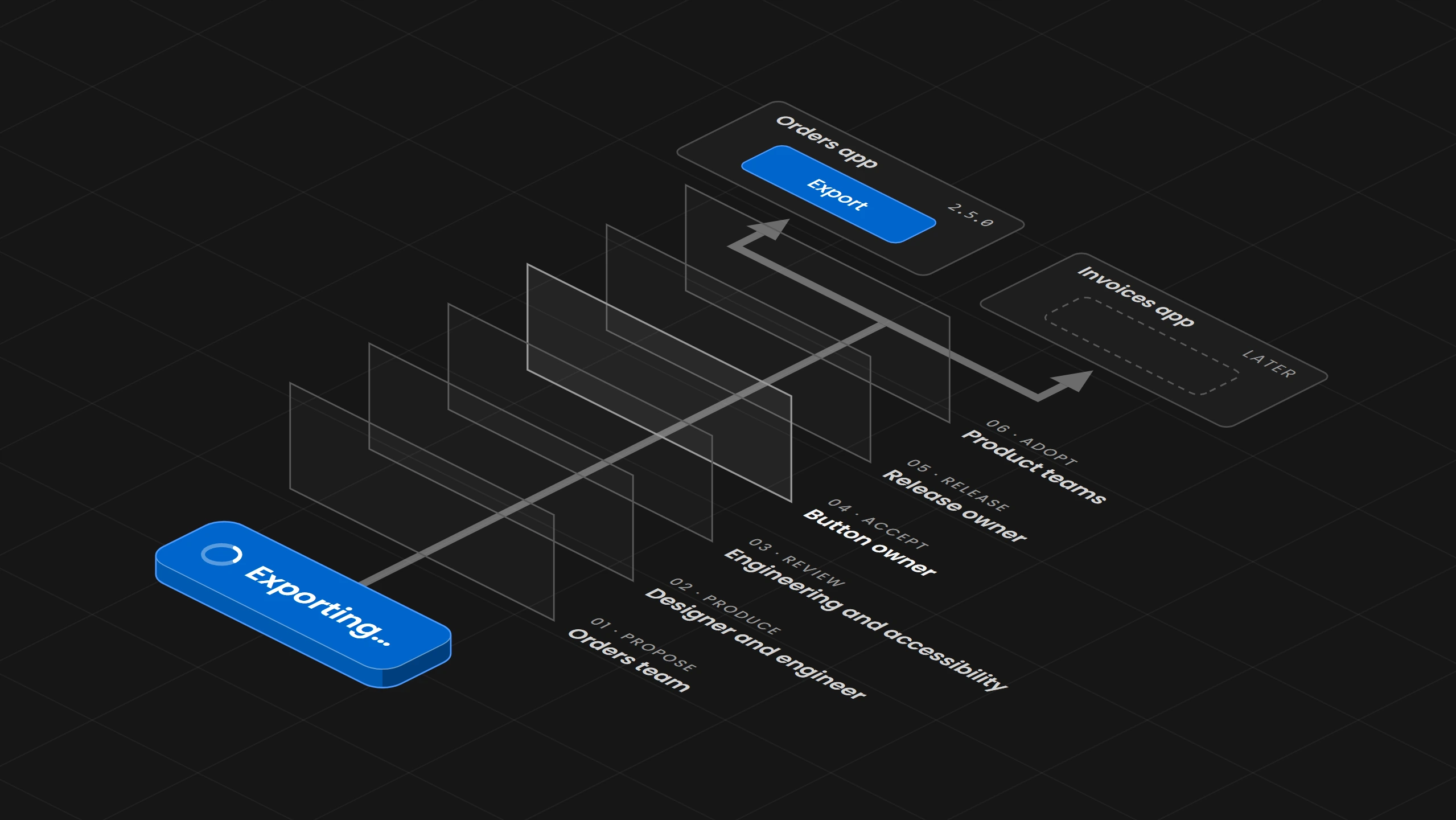
Split every change into six decisions, each with one owner, so a loading state on the Button gets an answer and a typo in the documentation does not wait behind a new component.
Overview
A design system that several teams depend on gets stuck when nobody can say who decides a change. The way out is to split one change into six decisions, which are proposing, producing, reviewing, accepting, releasing and adopting, and to write down one owner and one record for each. The review a change gets follows its size, so a typo in the documentation does not wait in the same queue as a new component. The first thing to write down is a table of the changes that come up most often, with the person who decides each one.
01. Introduction
A company has an orders app and an invoices app, and both use the same design system. The orders team needs a loading state on the main button, because after someone presses Export the file takes a few seconds and the button gives no sign that anything is happening. The team asks in the design system channel. The designer who drew the button finds the request reasonable, an engineer says the code belongs to whoever changed it last, and nobody says yes or no. After two weeks the orders team copies the button into its own code and adds a spinner. The orders app now has a button that looks like the shared one but no longer receives its fixes, and the invoices team, which needs the same state next month, will build a third version.
This happens when more than one team depends on the system and no one is named to decide, because the request then reaches people who can comment on it and nobody who has to answer it.
02. The Team Model Is a Choice
Teams usually describe ownership with three models, often called centralized, federated and hybrid. A company chooses between them by how much the system covers and how many people can maintain it.
- Centralized:
One dedicated team owns the shared components, their code, the releases and the support, and product teams contribute through a defined route. The core team accepts a shared change and fixes a shared defect, and a product team builds a pattern that only its product needs. - Federated:
Designers and engineers from several product teams share ownership of the shared parts and contribute directly. Their representatives accept a shared change together, and the team that built a part fixes its defects. - Hybrid:
A core team owns the foundations, such as the tokens and the basic components, while product teams own their own patterns within agreed rules. The core team accepts changes to the foundations, each product team accepts changes to its patterns, and a defect goes to the owner of the foundation or the pattern.
The label alone decides nothing, because a system called federated still stalls when nobody can say who accepts a change to the Button. So the model is chosen first, and then every decision inside it gets a name.
The Design Engine, a system that sits between an AI such as Claude Code and the product it works on, works from the same idea that one place decides. Each project has a design-engine.json file that names its design system folder, and the engine reads tokens, components and rules only from there. When it finds two candidate design systems in one project, it stops and reports the conflict instead of picking one by date or version.
The label alone decides nothing, because a system called federated still stalls when nobody can say who accepts a change to the Button.
03. Six Decisions for One Change
A change to the design system passes through six decisions, and each one needs an owner. For the loading state, the orders team proposes it with the Export screen and the seconds the user waits. A designer and an engineer produce it, the state in the Figma component and in the code with its spinner and a label for screen readers. Engineering and accessibility review it against the Button's specification. The button owner accepts it, and the accepted specification and examples are the record. The release owner ships it in a minor version, because the Button gains a state and nothing existing breaks, with an entry in the changelog. Then the orders team and the invoices team each decide when to adopt that version in their own product.
One person can hold several of these decisions, and in a small team the button owner may also do the release. They stay separate decisions, because a finished implementation is not yet accepted, and a released version is not yet in any product.
In the Design Engine, accepting a change is its own signed step. The engine prepares a change to the design system's source, such as a token value, as a proposal with the current and the new value, and it applies the change only with a signed approval that names the person and the exact operation. Every attempt leaves a run record, so the accepted decision can be traced later.
04. Writing the Owners Down
The owners go into a decision table that lists the changes that come up and, for each, who decides, who gives input and what the record is. For the orders and invoices apps, a new variant of the Button is decided by the button owner with input from both product teams and accessibility, and recorded in the specification. A new semantic token is decided by the token owner with the theme owners. A local exception is decided by the product team together with the owner of the affected component. The release is decided by the release owner, and the adoption by each product team.
The table then goes into the tools the team already uses. On GitHub, a CODEOWNERS file names the owners of each folder, so the button owner is requested as a reviewer on each pull request that changes the Button's code, and a branch rule makes that review required before a merge. GitLab does the same with Code Owners and approval rules. Figma has no setting that requires a reviewer before a library branch is merged, so a team keeps merging with the owners by giving edit access to the main Figma library file only to them. The decisions themselves go into a short record with the date, the decision, the reasons and the alternatives that were considered, which is how the GOV.UK Design System team keeps its public decision log.
The Design Engine keeps the same kind of table as a scope policy that the project owns, a file in its design system folder. Before an AI agent or a tool changes anything, the engine checks the request against that policy and records which files and actions the request allows, so a request about the Button cannot also change the tokens.
Figma has no setting that requires a reviewer before a library branch is merged, so a team keeps merging with the owners by giving edit access to the main Figma library file only to them.
05. Review That Follows the Size of the Change
The review a change gets follows what it changes for the people using the component, so small fixes do not wait behind a new component.
- A typo in the Button documentation:
Needs one owner to check it and the links on the page. - The loading state on the Button:
Changes how the button behaves, so it needs a specification, a review by engineering and accessibility, and a changelog entry. - A new component, such as a progress bar for long exports:
Needs the full route with evidence that more than one product needs it, the alternatives, the states and a person who will maintain it.
Public design systems split their routes the same way. GOV.UK takes a content correction as a pull request and a new component through a proposal and research, and Carbon has a shorter route for enhancements and bug fixes than for new components. A behavior change stays a behavior change even when the code change is two lines.
The Scope Firewall in the Design Engine sorts every request into a lane before any work starts. A change to one word of copy goes into the smallest lane with one focused check, a styling change gets a local preview and a build, and a change to interaction or state gets tests of that behavior. A request cannot quietly grow into the next lane.
A behavior change stays a behavior change even when the code change is two lines.
06. When the Answer Is No
A no from the button owner does not have to stop the orders team. If the owner decides that the loading state belongs to the orders workflow only, the team builds it locally as a recorded exception, with its owner, the reason, the risk that it drifts from the shared Button and the condition for looking at it again, such as a second product needing the same state. GOV.UK asks for a renamed copy when a team changes a component substantially, and Primer lets a team keep its own version when a proposal is not taken up. The condition for looking at it again is what keeps the exception from being forgotten.
When two teams disagree, the first step is to name the decision and the person who owns it, then to compare what the user's task needs with what the shared component promises. A vote on screenshots cannot settle a question about how a state behaves. If the owners still disagree, the question goes to someone with authority over both, together with the options and their consequences.
The Design Engine keeps an exception visible in the code. Its check after every edit compares new styles with the components of the design system, so the orders team's copy appears as .export-btn repeats Button with Use the class "button" instead of a new rule until the exception is closed.
07. Owners After the Release
Every component accepted into the system needs an owner after the person who contributed it leaves, so that someone still answers when it breaks. If the core team cannot maintain a contributed pattern, it stays with the team that built it, marked with the team that maintains it.
Adoption is a separate decision in each product, and the invoices team may stay on the previous version for a month. The dependency graph of each product repository in GitHub shows which version of the design system package that product uses, and Figma's library analytics, on the Organization and Enterprise plans, shows the insertions and detaches of each component and which teams' files use it. Under semantic versioning, a property that is being retired is deprecated in a minor release and removed only in a later major release, and the release notes point to what replaces it.
The owners also watch whether the route works. Requests without an answer, the same component detached again and again, and contributions nobody finished are the places to look for a decision that has no owner.
The Design Engine checks design and code against the approved system after every change. A raw value where a token exists, a color outside the design system or a component rebuilt inside a product appears as a finding with the rule behind it, so drift after a release has a clear owner to go to.
Adoption is a separate decision in each product, and the invoices team may stay on the previous version for a month.
08. Where to Start
Start with the five or so changes that come up most often in the system, such as a new variant, a token change, a bug fix, a documentation fix and a local exception. Write one row for each with the person who decides, the people who give input and where the record lives, put those owners into CODEOWNERS and the edit access to the main Figma library file, and send the next request through the table. INAGAWA Design sets this up with the Design Engine for a team's own design system.