How Do You
Release a Design
System Change
Without Breaking
Every Product?
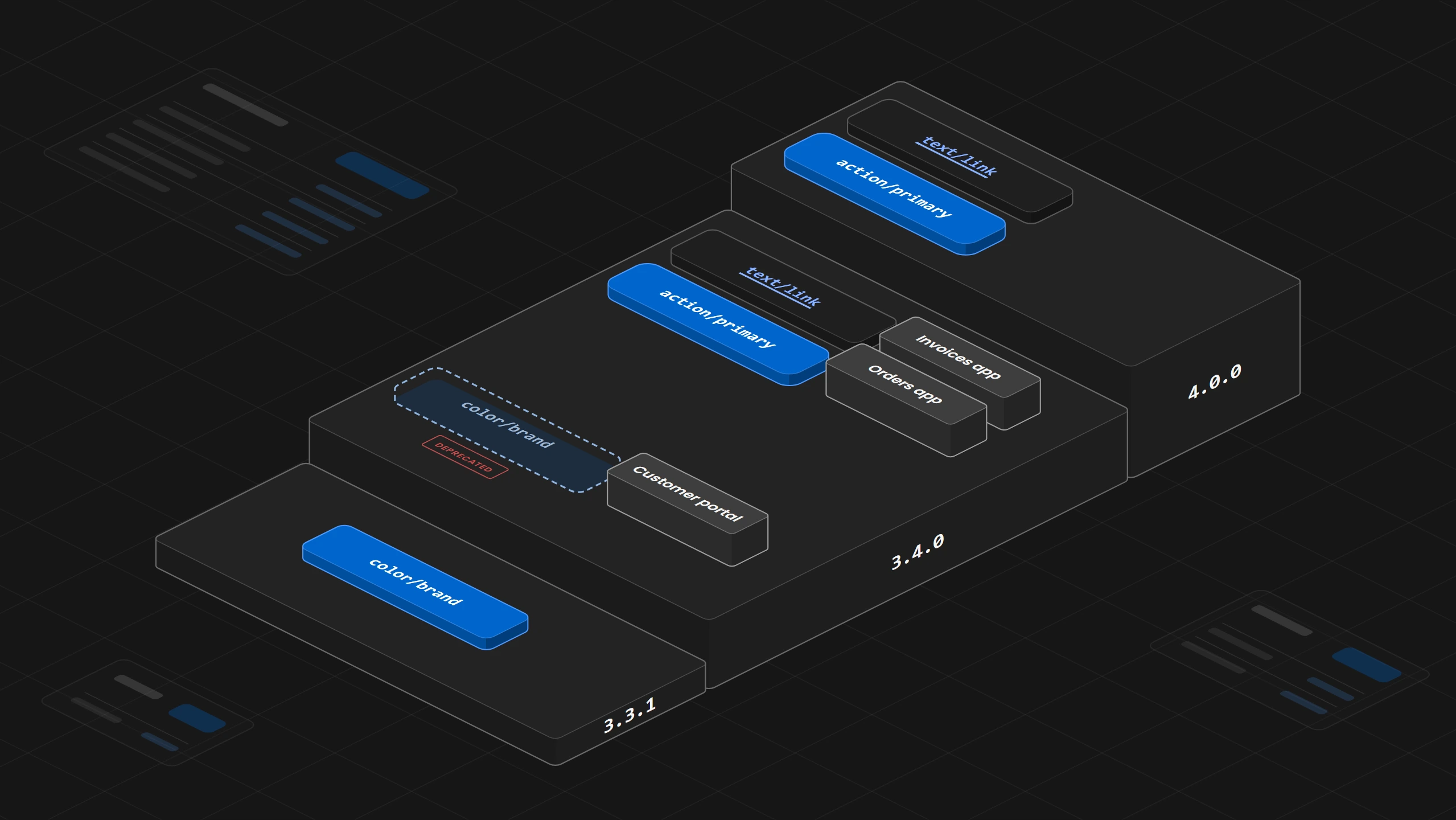
Add the new name before you remove the old one, so the new button and link colors arrive in 3.4.0 while the old color keeps working until 4.0.0 removes it.
Overview
A design system team releases a change without breaking a product when it adds the new name in one release and removes the old one in a later release. Before that, the team writes down what the products may rely on and numbers each release by the kind of change it contains. In between, the old name keeps working with a notice that it will be removed, each product moves its uses by what they mean, and the old name leaves once no product uses it anymore. The release note of that later release says what changed, which products it affects, what a team has to do, how to check that it worked and how to go back. Start by writing down what the products may rely on for the tokens and components they use most.
01. Introduction
Three products share one design system, the orders app, the invoices app and the customer portal. The token color/brand colors both their main buttons and their links, and the team wants links to get their own color. It ships the change as version 3.4.0, which adds action/primary for buttons and text/link for links and removes color/brand in the same step. The orders app and the invoices app move their code to the new tokens when they update. The portal's package file allows any version 3 release, so the next update of its packages brings in 3.4.0. The page still loads, but the buttons on its settings page have no background, because a browser treats a color that points to a variable that no longer exists as invalid and draws the background transparent.
The number 3.4.0 told the portal that nothing had to change, and the release removed a name the portal still used in the same step that added its replacement. The rest of this article takes the same change again, across two releases.
02. Write Down What Products Rely On
A product breaks when something it builds on disappears or starts to behave differently. So the team first writes down what the products may rely on, such as the token name color/brand and the Button's default type, which keeps a button from sending a form unless the product asks for it. The list of what products may rely on holds the component names and their properties, what each component does when a product sets nothing, and the token names. Anything on that list changes only with a warning to the products and a way for them to move.
Adobe's Spectrum Web Components publishes such a list, which it calls its public API, from component properties to file import paths.
The Design Engine reads the design system from one folder that the project names in design-engine.json. When it checks a product's code, it reports any color a component uses that this folder does not list.
03. What the Version Number Says
Each release gets a version number with three parts that tells a product team which kind of change it contains.
- 3.3.1, a patch release:
The last part goes up because the release fixes a mistake and changes nothing products rely on, such as a hover color that did not match the specification. - 3.4.0, a minor release:
The middle part goes up because the release adds the two new tokens and leaves everything else as it was. - 4.0.0, a major release:
The first part goes up because the release removes color/brand, which breaks every product that still uses it.
A change can break a product while all the code still builds. If the Button's default type changes from button to submit, the Clear button in the orders app's order filter starts sending the filter form when it is clicked, although the code builds as before. So the team decides which kind of change it is by asking what a product gets after updating when it changes nothing in its own code. GitHub's Primer React treats a change to how one of its public CSS variables behaves as a possible major change, because a product's own styling can stop working without any error.
This rule is called Semantic Versioning, and a team reads the first part before it updates to know whether it has work to do. A product whose package file allows any version 3 release takes 3.4.0 when it updates its packages, and it takes 4.0.0 only when its team changes the file on purpose. So the release in the introduction broke the portal. It removed a name under a number that promised nothing would break. Semantic Versioning also says how to retire a name, which is to mark it deprecated in a minor release and remove it in a later major release.
The design system folder that the Design Engine reads carries a marker file, design-system.json, which records the system's version and whether it is active, a draft or deprecated. When two folders both say they are active, the engine stops with DESIGN_SYSTEM_AMBIGUOUS and asks the team to name the right folder, and it never picks the folder with the higher version number on its own.
So the team decides which kind of change it is by asking what a product gets after updating when it changes nothing in its own code.
04. Add the New Name Before Removing the Old One
A name is never removed in the release that replaces it. Version 3.4.0 adds action/primary for buttons and text/link for links. color/brand keeps its old value, so nothing changes yet in any product. It is marked deprecated, which means it still works but will be removed. Its deprecation notice names the two replacements and the reason. It also names who owns the change, and that color/brand is removed when no product uses it anymore. GOV.UK Frontend retires names in the same two steps and gives the example of deprecating something in version 4.6.0 before removing it in 5.0.0.
In the token file the deprecation notice sits on the token itself, next to the value it is about. The reason and the replacements go into the $deprecated property of the W3C design tokens format, which takes true or a sentence, and the sentence can name a replacement as a reference such as {action.primary}. The owner and the condition for removal go into the token's description. In the file, color/brand is the token brand inside the group color, and a reference to another token is written with dots inside curly braces.
{
  "color": {
    "blue": {
      "600": {
        "$type": "color",
        "$value": { "colorSpace": "srgb", "components": [0, 0.4, 0.8], "hex": "#0066cc" }
      }
    },
    "brand": {
      "$type": "color",
      "$value": "{color.blue.600}",
      "$description": "Owner: design system team. Removed in 4.0.0 when no product uses it.",
      "$deprecated": "Links get their own color. Use {action.primary} or {text.link}."
    }
  }
}
The Figma library is published with the same two new variables in the same release, so designers and developers see the same names. The old variable gets the deprecation notice in its description, the way Figma recommends marking a deprecated component in its name and description, and a design file takes changes to the variables it already uses when someone accepts them under Review library updates. How one token file feeds both Figma and the code is explained in When Figma and the Code Disagree, Which One Is Right?.
The Design Engine makes a token change like this one only from an approved proposal that names the exact entry in the token file. It saves the file before the change and runs the required checks after it.
05. Move Each Use by What It Means
The release note tells each team what to do. A button that uses color/brand moves to action/primary, and a link moves to text/link. A search-and-replace would give every link the button color, because the old token meant two things, so each use is moved by what it colors.
A lint rule then keeps new code from picking up the old name. Atlassian's ESLint plugin has the rule no-deprecated-design-token-usage, which reports deprecated design tokens in the code it checks.
While an AI agent moves the uses, the Design Engine checks every file the agent edits and reports what it finds there, such as the old blue typed into the code as a value where the design system has a token, with the nearest token named.
A search-and-replace would give every link the button color, because the old token meant two things, so each use is moved by what it colors.
06. Keep a List of Who Still Uses It
The team keeps a list of remaining uses, the products that still use color/brand, found by searching each product's code for it, because a product that installed version 3.4.0 can still use the old name everywhere. When the orders app and the invoices app have moved and the portal still uses color/brand on its settings page, the removal waits for the portal.
On GitHub a search such as org:your-org content:"--color-brand" finds the files on the default branches of the organization's repositories that still contain the name. Figma's library analytics show which design files still use a variable, on Figma's Organization and Enterprise plans. Adopting a version is a decision each product team makes for itself, as Who Owns the Design System? explains, so the list of remaining uses comes from the products and not from the release.
07. The Release Note
Version 4.0.0 removes color/brand once the list of remaining uses is empty. Its release note says what changed, which products it affects, what a team has to do, how to check that it worked and how to go back, which here is to return to version 3.4.0, where color/brand still works.
Design system 4.0.0

What changed
color/brand is removed. It was deprecated in 3.4.0.

Affected products
None. The orders app, the invoices app and the customer portal
moved to the new tokens during 3.4.0.

What to do
Buttons that used color/brand use action/primary. Links use text/link.
Move each use by what it colors, never with one replace across the code.

How to check
Search the product's code for color/brand and --color-brand. Nothing is found.
Compare screens with a main button and a link against their saved screenshots.

How to go back
Return to version 3.4.0, where color/brand still works.
Playwright's toHaveScreenshot compares a screen with a saved reference image, so a button that lost its background shows up in the comparison. GOV.UK Frontend's release note for its version 6.0.0 lists each breaking change with what a team has to do.
The Design Engine keeps a record of every token change it applies, and it can restore the design system's token file to the state it saved before the change, checked against the file's fingerprint. A product that has to go back returns to version 3.4.0 of the package, which is its own team's step.
08. Where to Start
Start with the list of what the products may rely on, for the tokens and components they use most. Then take the next change through the two releases, with a deprecation notice on the old name in the first and a release note in five parts in the second. INAGAWA Design sets this up with the Design Engine for a team's own design system.