Why Do Teams
Build Their Own
Components When
the Library Has Them?
Ask the team what stopped it, such as a package that will not install with its React version or a Button size that exists only in Figma, fix that cause, then bring the library in through one real task.
Overview
When a product team builds its own buttons and fields next to a published library, the design system team first asks the team why and collects the evidence for each reason. A package that will not install, a Button size that exists in Figma and not in code and a team that stopped trusting the library after an update broke a screen each need their own fix, and an announcement or a rule fixes none of them. Once the cause is fixed, the system team brings the library into one real task with that team, writes down every time it had to help, and fixes the getting-started page, the examples and the support route with what the task showed. The library counts as used when the team's product installs a supported version and the task works with it. Start by asking the team that built its own components what stopped it.
00.
Table of Contents
01. Introduction
The company that runs the orders app and the invoices app starts a third app, the returns app, where support staff register a parcel that a customer sent back and start the refund. The library has a Button, a Text field and a Select, and each of them exists as a component in the Figma library that designers place and in the code package that engineers install. The returns team still builds its screen for registering a return with its own buttons, its own fields and its own colors. The system team finds out when it searches the company's code and the returns app imports nothing from the package.
Publishing a library makes it available. A team uses it once it can install the package, find the component it needs, use it for its own task and check that the task works, and the returns team stopped somewhere along the way.
The system team could announce the library again or make it mandatory for every app. Neither helps until the system team knows why the returns team built around the library, because a reminder or a rule does not remove whatever stopped the team. A mandate also hides the problem, because a team that cannot use the library for its task and has no way to ask for an exception keeps its own components and stops mentioning them. GOV.UK shows a rule with that way to ask. It requires services on GOV.UK to use its components and patterns, and it lets a team adapt a pattern when research shows the existing ones do not meet its users' needs, with the evidence shown at the service's assessment.
02. Ask Why the Team Built Its Own
So the system team asks the returns team what happened and collects the evidence for each reason, and the returns team gives two.
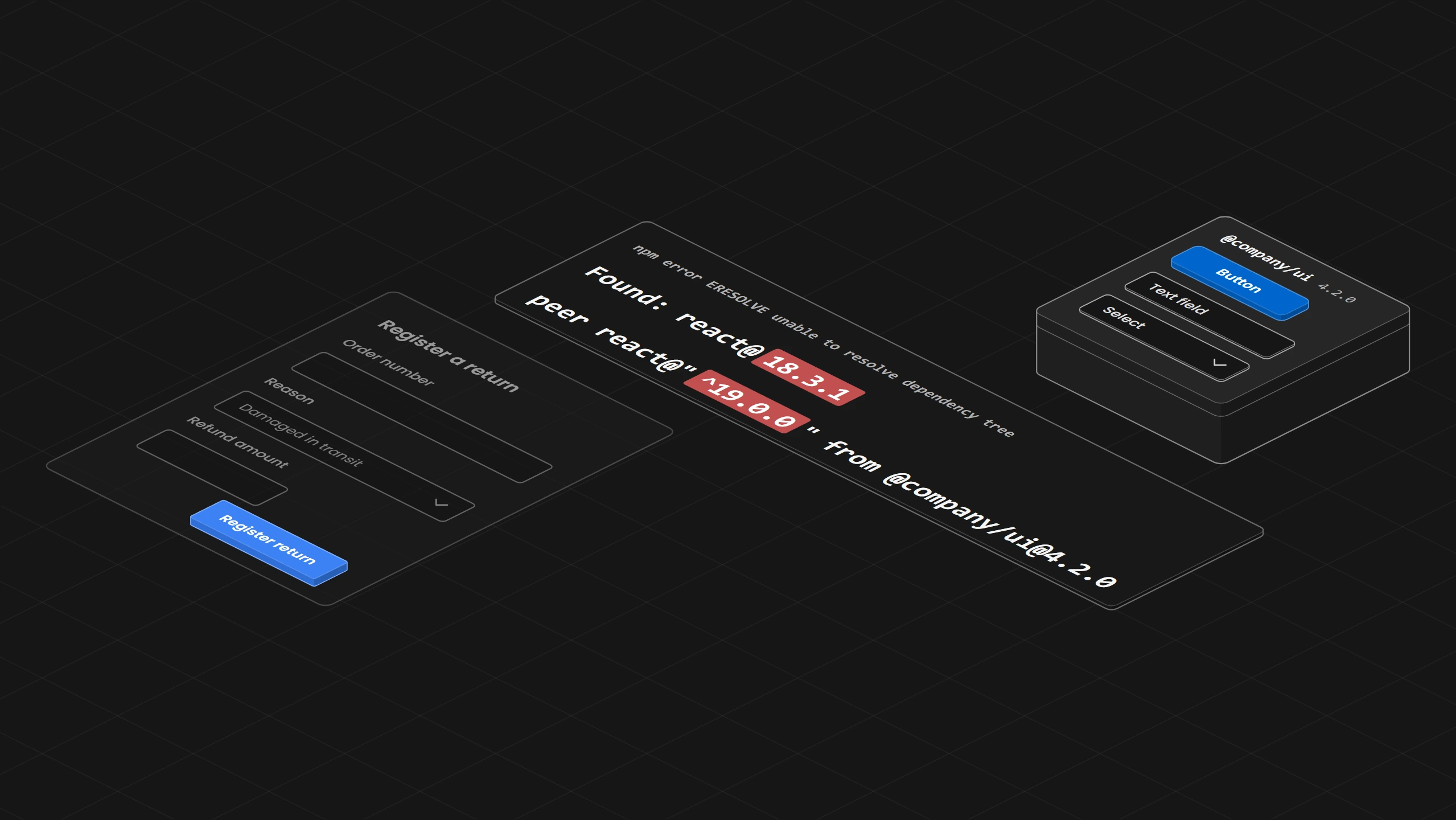
The engineer tried to install the package, and the install stopped with an error, because the package asks for a newer version of React, the JavaScript toolkit the returns app's screens are built with, than the app uses. npm, the tool that installs packages, prints both versions in its message, the React version it found in the app and the range the package asks for. The evidence is the package version, the React version and that message.
The designer placed a large Button from the Figma library, the coded Button has no large size, and so the engineer built a button that matched the design. The evidence is the version of the Figma library and the version of the package, with the two Buttons side by side.
The system team writes each reason down in one record, with what happened, the evidence and the fix, so the next team's reasons can be compared with these and a reason that comes back points to the part of the library that needs work.
03. Each Reason Has Its Own Fix
The install error is fixed by the system team. npm offers two ways past the error, --force and --legacy-peer-deps, and its own message says they accept an incorrect and possibly broken result, so the package would install while the conflict stays. The fix is that the package states which React versions it supports and the system team either supports the returns app's version or helps the team move to the newer one. The supported versions belong in the package itself, in the list of versions it accepts, and the documentation repeats that list. GitHub's Primer, for example, accepts React 18 and 19 in its package while its React page says React 17 or higher, so a team that reads only the page tries a version the package refuses.
The Figma Button is fixed by making Figma and the code agree. As When Figma and the Code Disagree, Which One Is Right? explains, a design option the code cannot support either gets built or is marked as unavailable in Figma, so the large size is either added to the coded Button or marked in the Figma library as not available in code. Some public design systems show this for every component. Octopus Deploy's component status page, for example, has separate Design and Code columns, so a component can be marked stable in design while its code is missing. More announcements would not make the package install, and a new component would not make the two Buttons match, because the Button needs the same sizes in Figma and in code.
Other teams give other reasons. An older app may stay on an old version because the upgrade changes too much at once, which needs help with the move or a move in steps, as How Do You Release a Design System Change Without Breaking Every Product? describes. A team may have stopped trusting the library after an update broke one of its screens, which is repaired with evidence that the problem is fixed, a named owner and a support route that answers. A component the library does not have, or a page nobody can find, is the case When Is It Okay to Step Outside the Design System? handles.
Atlassian's design system team described a component that could not do the task. Its one Button for every case did not fit the interfaces teams had to build, so teams customized it in many ways. The team added buttons for each purpose, such as an icon button and a link button, and moved teams to them by working with them directly, with new lint rules and with codemods, small programs that rewrite the old code.
More announcements would not make the package install, and a new component would not make the two Buttons match, because the Button needs the same sizes in Figma and in code.
04. Start With One Team and One Real Task
Once the two causes are fixed, the system team does not announce the library to every team at once. It first works with the returns team on one real task, which is called a pilot. The task is the form for registering a return, and the designer, the engineer and the tester of the returns team take part. The library supplies the fields, the button, the error message and the colors, and the returns app keeps what belongs to its own work, which is the refund rules, looking up the order and saving the return. The pilot is written down before it starts.
Task:          register a returned parcel in the returns app
Team:          returns designer, engineer and tester
Library gives: Text field, Select, Button, error message, theme colors
App keeps:     refund rules, order lookup, saving the return
Starts from:   the working form with the team's own components
Done when:     the form registers a return with the library's components,
               and the team knows what stays its own and whom to ask
Evidence:      the app's build, the empty order number, the accepted task
Left out:      a new navigation, the app's other screens
A new navigation for the app stays out, so the pilot does not turn into a redesign. The buttons and fields the returns team already built on its other screens stay as they are during the pilot and move to the library afterwards one screen at a time, for example when the team next changes a screen, so the app is never rebuilt all at once. USWDS, the US government's design system, says the same in its maturity model, that a team does not need to adopt the design system all at once.
During the pilot the system team writes down every time it had to step in. The engineer saw the new fields without their colors until someone from the system team explained that the theme file, the file that holds the colors, has to be loaded first. That help counts as part of the effort, and it shows that the getting-started page, the page that tells a new team how to begin, is missing a step.
The Design Engine's audit can be limited to the lines the pilot changed. Given the commit the pilot started from, it keeps only the findings on added or changed lines, such as a color typed in as a hex value where the design system has a named color for it, and each finding names the part of the engine's knowledge base that explains its rule. So the review of the pilot covers the return form and leaves out the old screens the pilot did not touch.
05. A Getting-Started Page That Ends in a First Real Use
The getting-started page is fixed until it ends in a first real use. It says which version to choose, what the app needs first, such as the supported React version, and how to install the package and load the theme. It then gives one complete small form example, says what the product still does itself and names whom to ask.
Public getting-started pages show the first of these steps. GitHub's Primer has the engineer wrap the app in its theme components before the first Button. The GOV.UK page for installing its frontend package names the Node and Sass versions it needs and shows how to add the styles, fonts and images, and it warns that the accordion it uses as its example shows a generic font and does not respond until the JavaScript is set up, which is the kind of step the returns engineer missed.
The designer starts by adding the Figma library to the design file, and the engineer starts by installing the package. One can be done without the other, so each gets its own entry on the page, and both lead to the same rules.
06. Examples and Training Built on Real Decisions
The form example shows who holds the value of a field and what happens when the order number is left empty. It also says which parts the library supplies and which the returns app adds, such as checking that the order exists, and the customer data in it is marked as made up.
The training works with the decisions the team makes in its own task. It asks the team to choose between a Select and radio buttons for the reason of a return, to notice that a large Button does not exist in code, and to know where a request for a missing component goes.
When the returns team builds with an AI coding agent, the Design Engine checks each file right after the agent edits it and tells the agent which findings sit on the changed lines of that file, together with the part of the engine's knowledge base that explains each rule. The reason for a rule then arrives at the moment the decision is made.
07. A Support Route That Says What to Send
The support route says what to send, which is the version, the setup, the task and the steps that show the problem, and who answers. GOV.UK Frontend's bug report, for example, asks for a description, the steps to reproduce the problem, what happened against what was expected, and the operating system, the browser and the version of GOV.UK Frontend. The route promises no response time the system team has not committed to.
Because the returns screen shows customer names and addresses, the route accepts the same problem shown with made-up data, so nobody has to share a customer's record to report a broken field. GOV.UK's contact page offers a private route of its own, email for questions a team does not want to ask in public.
08. What Counts as Using the Library
The system team counts the returns app as using the library when its build installs the supported version, the return form uses the library's components and works, the team knows what stays its own and its question got an answer. A workshop the team attended or access to the Figma library does not count. The counts that public tools offer measure activity. Figma's library analytics count a component's instances, inserts and detaches in design files, and a code scanner such as react-scanner counts how often a component appears in the source code. None of them says whether the returns app installs a supported version or whether its form registers a return.
The record of what the returns app installs carries the date it was checked, so a check after the next package release shows whether the app still installs a supported version. Before the next team starts, the system team fixes what the pilot found, such as the missing step on the getting-started page.
A workshop the team attended or access to the Figma library does not count.
09. Where to Start
Ask the team that built its own components what stopped it, collect the evidence for each reason and fix the cause. Then run one real task with that team, write down every time you had to help, and fix the getting-started page with what the task showed before the next team starts. INAGAWA Design sets this up with the Design Engine for a team's own design system.