What Should Your AI
Instruction Files
Say About Your
Design System?
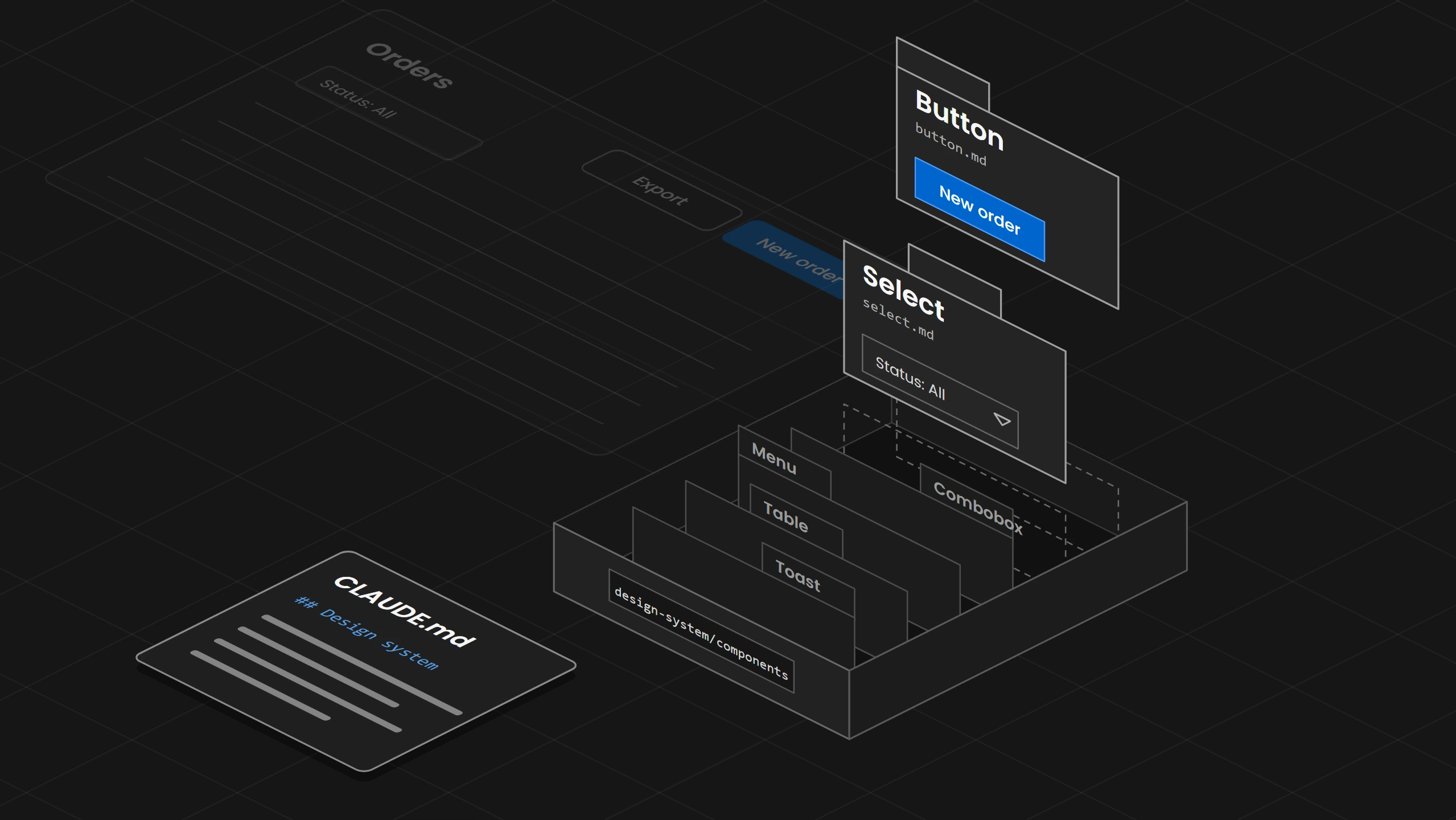
Keep the instruction file short and give every component its own page, so a request for a status filter leads to the system's select and Export joins the screen as a secondary button.
Overview
An AI coding agent builds with a design system when it gets two kinds of files. The first is one short instruction file that the agent reads at the start of every session, such as CLAUDE.md for Claude Code, and it says only where the design system lives, which rules always apply and which check runs after every change. The second is one page per component, which the agent opens only when the task needs that component, and which says when to use it, how to build it, where the exception is and which mistakes to avoid. Three additions make the pages easier to use, which are a list of the words people use, a label on every entry that says whether it is a rule, a recommendation or an example, and a note on every exception that names its product. Start with the short instruction file and the page of the component your team uses most.
01. Introduction
The team of an orders app has written one long Markdown file for its AI agent. It lists every component of the design system by name, from Button to Toast, and adds a few rules about colors. Someone asks the agent to add a status filter and an Export action to the orders list. The agent builds its own dropdown for the filter and adds Export as a second primary button next to New order, so the screen now has two primary buttons and a filter the design system already had.
The file named the components but did not say which one fits a filter, when a button is primary or where the agent could find out. With a list of names and nothing else, the agent guessed from how things look.
02. Two Kinds of Files
The agent needs two kinds of files because the tools read files at two different moments. The instruction file is read at the start of every session, so everything in it takes up room in every task, whether the task touches the design system or not. The component pages are read only when a task needs them, so a page can be longer than the instruction file without costing room in every task.
Each tool has its own name for the file it always reads and its own way to load a file only when it is needed.
- Claude Code:
Reads CLAUDE.md at the start of every session, and Anthropic recommends keeping it under 200 lines. A rule in.claude/rules/with apathsfield loads only when the agent works on matching files, and a skill is listed by its name and description until a task needs its full text. - Cursor:
Applies a rule of the type Always Apply to every chat, and Cursor recommends keeping a rule under 500 lines. The other rule types load by description, by file pattern or by hand, and a file that a rule mentions is read only when the agent needs it. - GitHub Copilot:
Reads.github/copilot-instructions.mdfor every request in the repository, and a file in.github/instructions/with anapplyTopattern only for matching files. Copilot also loads skills when a task matches them. - AGENTS.md:
The shared file that Cursor, Copilot and Codex read. Claude Code can read it in place of CLAUDE.md.
Splitting the long file into several files with imports does not make it smaller. Claude Code loads an imported file together with the file that imports it, so the imported text takes up the same room as before. The component pages belong where the tool loads them only when a task needs them.
The Design Engine finds the design system through one file in the project root, design-engine.json, which points to the design system folder. That folder keeps the tokens, the components, the decisions and the exceptions in their own subfolders, and the engine reads only the parts the task needs.
Splitting the long file into several files with imports does not make it smaller.
03. What the Instruction File Says
The instruction file says three things about the design system. It says where the design system lives, so the agent can find the component pages. It names the few rules that apply to every task, such as a token for every color. It names the check that runs after every change. Anything that applies to only one component goes on that component's page.
In the orders app the design system part of CLAUDE.md is short.
## Design system
The design system lives in design-system/.
Before you use a component, read its page in design-system/components/.
Use a color token for every color, never a color value.
Use only components that have a page. If none fits, ask before you build a new one.
After every change, run npm run check:design and fix what it reports.
The vendors give the same advice. Anthropic recommends instructions concrete enough to verify, such as the exact command to run, and GitHub says instructions work best as short, self-contained statements.
The design system folder also holds the project's scope policy, design-engine.scope.json, which sets what a request may change. The Design Engine turns each request into a boundary of the files the change may touch and the actions it may take, and it checks every action and the changed files against that boundary.
04. One Page per Component
A component's page tells the agent how to use the component. The record that connects the component to its code and tokens is explained in How to Make AI Use Your Design System, and the page around the record says when and how to use the component. The Button's page in the orders app says to use the primary button for the one main action on a screen, because two primary buttons compete for attention and the person no longer sees which action matters. It shows how to build it with the Button component from the code and the color token action/primary. It names the exception, a dialog that confirms a deletion, where the main action is the danger button and the primary button is not used. It lists the common mistakes, such as two primary buttons on one screen or a color value typed in where the token belongs.
Public design systems publish pages like this for AI agents. Atlassian's Button page says to "only include one primary button or call to action" in a page or area, and Atlassian hands its usage guidance, examples, properties and accessibility notes to AI agents through an MCP server.
The Design Engine's own knowledge is written in the same shape. Each topic has headings for the practical recommendations, why they matter, when they apply, the exceptions and limits, and the counterexamples and common failures.
05. The Words People Use
People ask for a dropdown, and in the orders app a dropdown can be three different components. A select lets the person pick one value from a fixed list, such as an order status. A menu lists actions, such as Export and Print. A combobox lets the person type to search a long list, such as customer names. So the pages carry a word list that says which component each word leads to and how to choose between them, and for the status filter the agent picks the select because the person picks one status from a fixed list.
The list needs the reason next to each word, because the same word leads to different components depending on what the person does. The shadcn/ui skill for AI agents has a table with a Need column and a Use column, and MUI's Select page sends combobox and autocomplete needs to its Autocomplete component.
Every topic in the Design Engine's knowledge carries a list of the words people use for it, and the engine's search matches those words along with the title, so a search with the user's word finds the topic.
The list needs the reason next to each word, because the same word leads to different components depending on what the person does.
06. Rule, Recommendation or Example
Every entry on a page gets a label that says how strictly the agent has to follow it. A rule is something the team enforces, such as one primary button per screen. A recommendation fits a certain situation, such as moving Export into a menu when a toolbar already holds three actions. An example shows one way to do something, such as a screenshot of the orders list. Without the label the agent can treat the screenshot as a rule and copy its spacing into every new screen.
Atlassian shows some of its Button guidelines with a do example and a do-not example, and the shadcn/ui skill keeps its principles apart from its critical rules.
Every recommended value in the Design Engine's knowledge is classed as a Requirement, a Convention or a Guideline, and a decision the product made overrules general advice for that product.
Without the label the agent can treat the screenshot as a rule and copy its spacing into every new screen.
07. Exceptions That Stay Where They Belong
An exception is a place where one product departs from the design system on purpose. The orders app shows its order table in a compact density so more orders fit on the screen, which the design system does not use by default. When the exception sits only in the code, the agent reads it as the way tables are built and uses the compact table in the invoices app too.
So every exception gets a note that names its product, its owner and when to look at it again. When to look at it again can be a date or an event, such as the day the design system releases its own compact table. Equinor's design system asks teams to "document exceptions when teams need to deviate from standard components". In the code a linter can ask for the reason, such as Stylelint's reportDescriptionlessDisables option, which reports a comment that turns off a rule without saying why.
The Design Engine keeps exceptions in their own folder in the design system package, and its exception check reports an exception that has no owner or whose end date has passed.
08. The Check After Every Change
The instruction file names the check, because a written rule tells the agent what to do and only a check shows whether it did. Anthropic says Claude Code treats CLAUDE.md as context, not enforced configuration, and GitHub says Copilot may not always follow its custom instructions in the same way. Claude Code, Cursor, Codex and Copilot can each run a command after the agent edits a file and hand its findings back to the agent, so the agent can fix the change before a person sees it. How such a check compares an edit with the components is explained in How to Make AI Use Your Design System.
The Design Engine runs its component check after every edit and names the component the agent should have used. When the agent writes its own export button, the check answers .export-btn repeats Button with the class to use, and the agent replaces its button in the same turn.
The instruction file names the check, because a written rule tells the agent what to do and only a check shows whether it did.
09. Where to Start
Start with the instruction file and the page of the component your team uses most, which in the orders app is the Button. Keep the instruction file to where the design system lives, the rules that always apply and the check. Then add the word list, and then the page of the next component. INAGAWA Design sets this up with the Design Engine for a team's own design system.